
01
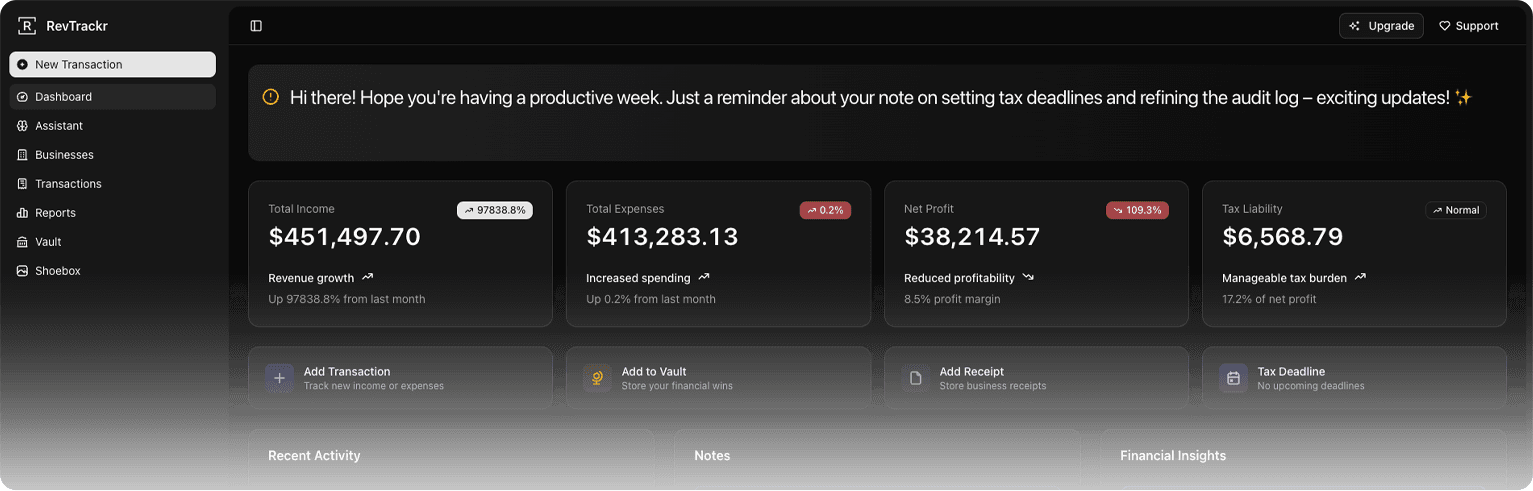
Comprehensive Dashboard
An instant view of your financial health — income, expenses, net, and tax estimations sitting calmly in one place.
For every income stream
RevTrackr helps freelancers, creators, consultants and small businesses track income, expenses, receipts and what’s left across their work.
14d
Free trial on paid plans
$0
Free tier, forever
∞
Businesses & transactions on Pro
Everything inside
A small, considered set of tools — built so independent workers and small businesses can run their finances without a finance team.
An instant view of your financial health — income, expenses, net, and tax estimations sitting calmly in one place.
Run several income streams or entities from a single account. Each one stays clearly separated, never tangled.
Log income and expenses by business in seconds. Categorize, filter, export — your books stay current without effort.
Where supported, quarterly and annual estimates update as your numbers do. Set the right country and tax basis first.
Ask the assistant anything from your books. Trends, anomalies, plain-language summaries — without exporting a spreadsheet.
Snap a photo, get a transaction. Reads vendor, amount, currency and date off the image, then files it under the right business.
Invite a partner, accountant or assistant into a specific business. Granular access, no oversharing.
How it works
Most accounting apps take a weekend to set up. RevTrackr is designed to be useful within twenty minutes — and quietly more useful from there.
Step 01
Email and password. No card, no questionnaire — you're in within a minute.
Step 02
Set up the entity (or entities). Country, currency, tax basis and fiscal year — once, then forgotten.
Step 03
Choose the tax settings and reminders that fit your country. Sensible defaults if you'd rather not think about it.
Step 04
Log income and expenses against a business. Filter, search, export when you need to.
Step 05
Upload the photo and we file it. OCR pulls the details so the shoebox stops growing.
Step 06
Quarterly summaries, tax estimates, and an AI assistant when something doesn't add up.
Pricing
Four plans. Cancel any time. No surprise charges, no usage fees, no aggressive upgrade prompts. Start on Free for as long as it serves you.
Track the basics. Upgrade whenever you outgrow it.
Multiple businesses, no AI overhead. The freelancer staple.
Everything most freelancers need to feel handled.
Dedicated support, advanced integrations, priority everything.
14-day free trial on Pro and Ultra. Cancel any time, no charge. Plus is a flat monthly price with no trial — cancel any time.
Questions, answered
RevTrackr is global at its core. Tax rules are not, so we tell you where the product applies and where it does not.
A clearer view
One workspace for the money moving through independent work — without pretending every business has the same tax rules.
Every stream
Keep income from clients, products and side projects together without losing the detail behind each business.
Every expense
Capture expenses and receipts as they happen, then find the right transaction when you need it.
One calm view
Use reports, exports and tax tools where they apply to keep your next financial decision grounded in real numbers.
Ready when you are
Start on the Free tier and see every income stream, expense and receipt in one place. Upgrade only when you need more room.
Tracking income from more than one place? See the simple setup.
Prefer a guided first setup? Ask for a 15-minute walkthrough.